How industrial AR evolved from lab curiosity into a core Industry 5.0 enabler
Table of Contents
For many years, Augmented Reality was perceived as a futuristic concept that looked impressive in demonstrations but failed to create lasting value in real production environments, mainly because the technology was either too heavy, too expensive, or simply not usable for operators working eight-hour shifts under real industrial conditions.
Today, that situation has fundamentally changed.
Modern AR solutions are no longer experimental, no longer limited to pilot projects, and no longer dependent on awkward wearable devices that workers never fully accepted. Instead, AR has become a core productivity technology that supports operators in real time, eliminates human errors at the source, accelerates training, and allows manufacturers to standardize best practices across plants and continents.
Augmented Reality (AR) in manufacturing is a technology that overlays digital information -such as instructions, highlights, or visual cues, directly onto the physical workspace to guide operators during production tasks. Instead of relying on paper manuals or separate screens, AR allows workers to see contextual information exactly where it is needed, whether on a component, tool, or workstation. This helps operators perform complex assembly, inspection, or maintenance tasks more accurately and efficiently. By connecting digital instructions with the real-world environment, AR reduces interpretation errors, accelerates training, and improves overall productivity on the shop floor. In many modern factories, AR is increasingly used for applications such as assembly guidance, quality control, and operator training.
The development of augmented reality (AR) in manufacturing has followed a clear technological timeline, evolving from experimental research to practical shop-floor solutions.
1960s–1980s: early AR concepts emerged in research laboratories where head-mounted displays were built to explore how digital graphics could be combined with the real world. These systems were bulky, expensive, and never intended for industrial environments.
1990s: the first major industrial milestone occurred when engineers at Boeing introduced the term Augmented Reality while developing systems to guide technicians through complex aircraft wiring tasks. By overlaying digital instructions directly onto the physical aircraft structure, they demonstrated how AR could reduce assembly errors and training time.
2013–2015: with the rise of powerful smartphones and tablets, AR began reaching the shop floor through mobile applications for maintenance guidance, remote expert support, and technician training.
Late 2010s–2020s: advances in machine vision, sensors, and industrial computing enabled AR systems to integrate with MES, ERP, and quality systems, transforming AR from experimental technology into a practical tool for operator guidance, quality assurance, and training in modern manufacturing environments.

Today, several types of industrial augmented reality technologies are used to deliver digital guidance to operators. Each approach has different strengths depending on the task, environment, and level of interaction required. The three most common categories are wearable AR (smart glasses), tablet-based AR, and projection-based AR.
| AR Technology | Typical Use Cases | Advantages | Limitations |
| Wearable AR (Smart Glasses / Head-Mounted Displays) | Field service, maintenance, mobile warehousing | ✓ Hands-free operation ✓ Remote expert support possible ✓ Mobile and flexible | – Not designed for prolonged use in many factory environments – Battery limitations – Can obstruct the operator’s field of view |
| Tablet / Mobile AR | Service manuals, field training, maintenance support | ✓ Familiar interface (tablets and smartphones) ✓ Easy to deploy | – Requires one hand to hold the device – Split attention between screen and physical task – Battery limitations – Not optimized for step-by-step assembly guidance |
| Projection-Based AR | Assembly guidance, work instruction standardization, part picking and kitting, on-the-job training | ✓ Right information at the right place ✓ Non-distracting for operators ✓ Fully hands-free ✓ Suitable for continuous industrial use | – Fixed workstation setup required – Can sometimes be perceived as intrusive if tasks are extremely repetitive |
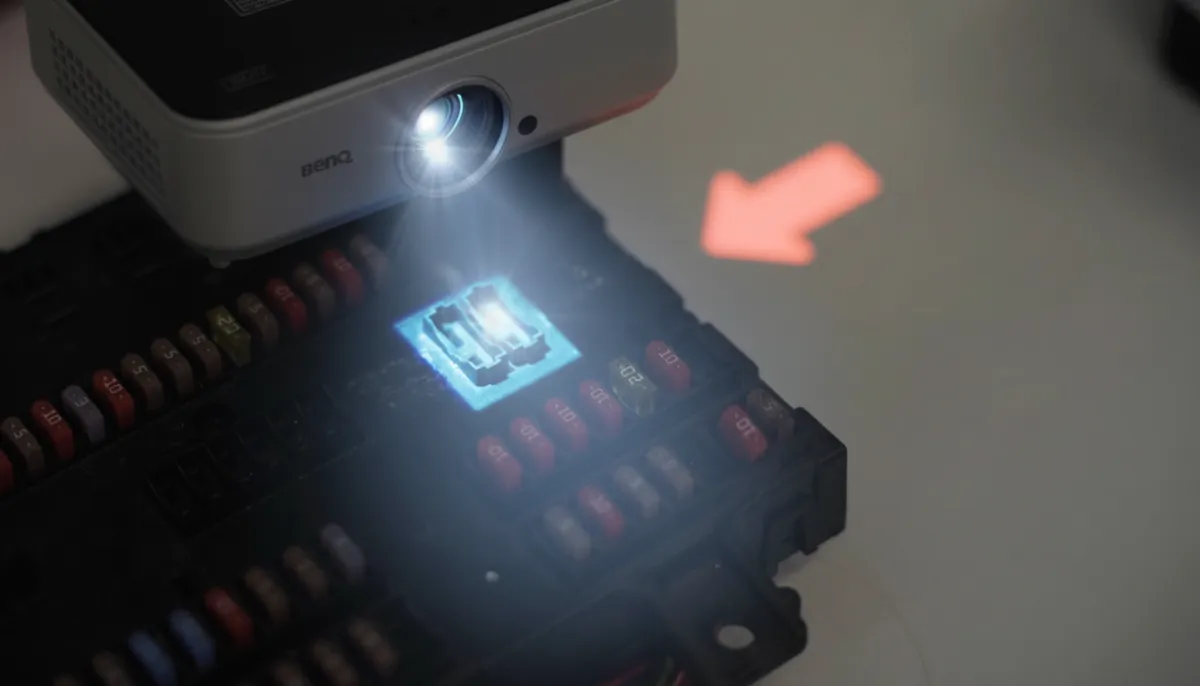
Projection-based AR is increasingly used in assembly-heavy manufacturing environments, where operators need both hands free and guidance must appear directly on the work surface. By projecting instructions onto components, tools, or workstations, it eliminates the need for wearable devices and reduces cognitive load during complex tasks.
To understand how industrial task guidance evolved from paper manuals to digital screens and eventually projection-based AR, read From Paper to Projection: The Evolution of Task Guidance in Industry.

The most important reason for the growing success of projection-based AR in manufacturing is simple:
Operators don’t have to wear or hold anything.
No glasses.
No tablets.
No additional hardware attached to the worker.
This makes the technology far easier to adopt on the shop floor compared to head-mounted displays or handheld devices. Instead of requiring operators to interact with a separate device, projection systems bring the digital information directly into the workspace.
Key benefits include:
This is particularly important in assembly environments where operators rely on both hands to handle tools and components. By removing wearable devices entirely, projection-based AR eliminates many of the biggest barriers that have slowed AR adoption in industrial settings.
One of the most impactful applications of augmented reality on the shop floor is AR work instructions. Instead of asking operators to constantly switch their attention between a screen and the physical product, projection-based AR displays instructions directly onto the workstation or component. This eliminates interpretation, reduces cognitive load, and helps operators execute complex tasks more accurately.
In environments with high product variability, visually similar components, or complex wiring paths, this contextual guidance significantly reduces mistakes and training time. Operators can immediately see what needs to be done and where, without mentally translating instructions from a screen.
If you want to understand when projection-based AR clearly outperforms traditional screen-based solutions, explore our detailed article on AR Work Instructions in Manufacturing: When Projectors Win.
Projection-based AR is ideal for fixed workstations. Some systems support moving objects, but layouts are less flexible than mobile AR.
Projectors must illuminate the relevant surfaces.
Make sure operators don’t block the projection cone during normal work.
Rule of thumb:
The more variants, the more important it becomes to automate instruction creation through:
if you don't have a lot of variants, avoid that AR is more seen as intruisive rather than helpful, if the work is very repeititve and operators do it day in and day out..
Define whether AR is intended for:
Verify that there is sufficient overhead space to install projectors in the required positions.
Define how operators confirm that a task step is completed. This decision strongly influences usability, pace, and data quality.
Option 1: Time-based validation (Timer)
The instruction automatically advances after a fixed duration.
Option 2: Manual confirmation (Physical push button)
Operators confirm each step themselves.
Option 3: Automated validation (Machine Vision, 3D sensors, RTLS)
The system automatically detects correct completion and moves to the next step.
Introducing projection-based AR is not only a technology project, it is a behavioral and cultural change on the shopfloor.
Operators should not experience AR as something “imposed from above”.
This builds ownership instead of resistance.
Explain clearly:
Operators must understand that AR is there to support them, not to monitor or replace them.
Allow configuration levels so AR does not feel like a constraint for experienced staff.
Hands-on onboarding is essential:
Confidence comes from doing, not watching.
After go-live:
When operators see their feedback translated into system improvements, acceptance accelerates dramatically.
Bottom line:
The success of AR on the shopfloor depends far more on people adoption than on projection accuracy or software features. Technology enables change, but people make it real.
Modern AR operator guidance systems are increasingly integrated with machine vision to validate operator actions and automate workflows. With the rapid emergence of AI, these systems are becoming significantly smarter, allowing workflows to adapt dynamically based on what the system sees. As devices become lighter, less intrusive, and more intuitive, the likelihood of human error will continue to decrease while operator acceptance continues to rise.


AR platforms are evolving into technology-agnostic hubs that connect with a broad ecosystem of tools such as RTLS (real-time location systems), RFID, smart sensors, machine data streams, and torque tools. Rather than acting as a standalone application, AR is becoming the central orchestration layer for shopfloor actions, coordinating instruction design, execution, and real-time decision intelligence across the factory.
Manufacturing is moving toward a fully connected ecosystem where:
These systems are becoming seamlessly linked, creating a continuous digital thread that eliminates data silos and ensures that the right instructions are delivered at exactly the right moment.
AR is no longer just about visual guidance. It is becoming a powerful analytics engine that captures granular shopfloor behaviour, including:
AI-driven automation will increasingly generate instructions automatically, drastically reducing the administrative burden on process engineers so they can focus on high-value work rather than content creation.
Many platforms position AR as the heart of their solution, but in reality AR is simply one of many tools available to error-proof operator actions. In some environments, AR may not even be the best option - for example, when workstations are highly mobile, operators move constantly, or when projection-based AR becomes unnecessary once workers have fully internalized the process and simply switch it off.
The real objective is not AR adoption.
The objective is smarter manufacturing - and AR is only one of the instruments that makes it possible.
Project the correct bin directly onto the shelf.
Benefits:

AR displays the right instructions at the right time - especially powerful for high-mix production.
Benefits:
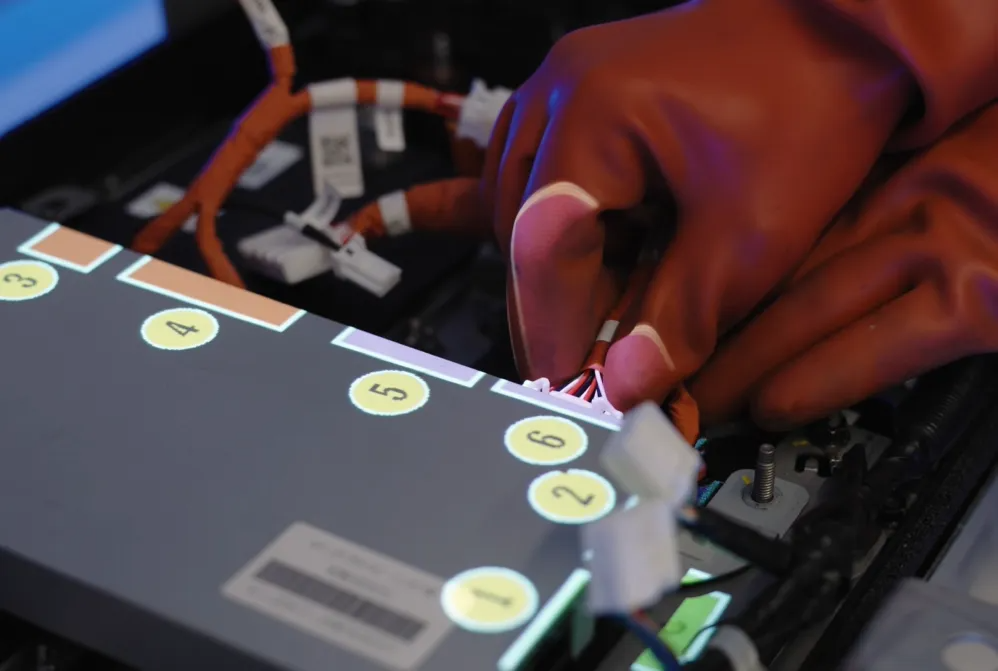
Every repair is different. AR dynamically displays instructions based on the detected issue.
Benefits:

Visual instructions reduce dependency on supervisors.
Benefits:
Visuals tell more than a thousand words.
In aerospace manufacturing, large structures and extremely tight tolerances make assembly processes highly challenging. At Spirit AeroSystems, AR-based operator guidance was implemented as part of the Project LEAD digital assembly cell, combining smart tools, machine vision, and projection-based AR to guide operators during complex wing assembly operations. The system highlights drilling locations directly on large aerospace components and automatically advances instructions once tasks are correctly completed. This approach improves repeatability, enables in-process validation, and captures detailed manufacturing data for full traceability.
Learn more in the case study:
https://ansomat.co/references/spirit-aerosystems-uses-ansomatic-for-complex-wing-assembly-to-create-next-generation-assembly-environment
For critical aerospace components such as engine boosters, even small assembly mistakes can compromise safety and reliability. Safran implemented an AR-guided tightening solution that projects the correct bolt sequence directly onto the component while machine vision verifies tool positioning. If the operator attempts to tighten the wrong bolt, the system prevents the tool from activating and provides visual feedback to guide the correct step. This ensures strict adherence to cross-sequence tightening patterns, eliminates assembly errors, and provides full torque and angle traceability for each bolt.
Read the full reference:
https://ansomat.co/references/safran-digital-error-proofing-for-critical-aero-booster-assembly
The rapid growth of electric vehicles has created new challenges for battery repair and remanufacturing processes. At Autocraft’s EV Battery Repair Centre, AR-based operator guidance helps technicians safely disassemble and repair complex battery packs. By projecting step-by-step instructions directly onto the workspace, the system ensures technicians follow the correct procedures for high-voltage components while reducing training time and improving consistency. This digital guidance approach enables faster onboarding of new technicians and ensures safe handling of EV battery systems.
Explore the full case:
https://ansomat.co/references/autocrafts-groundbreaking-ev-battery-centre-using-ar-based-operator-guidance
Battery assembly for electric vehicles requires precise sequencing and strict process control to prevent defects. At VDL, AR-based operator guidance was introduced to eliminate operator mistakes during EV battery assembly. The system visually guides workers through each step of the assembly process while validating actions through connected tools and sensors. This ensures the correct sequence is followed, reduces reliance on operator memory, and significantly improves first-time-right production in high-complexity assembly environments.
See the full customer story:
https://ansomat.co/references/vdl-eliminate-operator-mistakes-during-ev-battery-assembly-process

Although manufacturing is one of the most prominent adopters of AR, the technology is transforming many industries. In factories, AR helps workers assemble complex products, detect errors earlier, and follow digital work instructions with higher accuracy. In healthcare, AR assists surgeons with visualization and training, while in construction it overlays building plans directly onto job sites to reduce alignment errors. Automotive companies use AR both for production processes and customer-facing experiences such as heads-up displays and product visualization.
These cross-industry applications highlight how AR improves productivity, training, and decision-making wherever complex tasks intersect with human workers. You can explore more real-world examples in our article on 9 Industries Benefitting from Augmented Reality (AR).
Augmented Reality in manufacturing is no longer experimental.
It is a proven productivity, quality, and workforce-enablement technology - and projection-based AR is currently the most practical way to bring AR to the shopfloor at scale.
AR is not the destination.
It is the accelerator for the factories of the future.