


10 trainings every week to get up to speed with Ansomat Operator Guidance Software
Date: Thursday 28/05 - 10.00 CET
Duration: 1 Hour
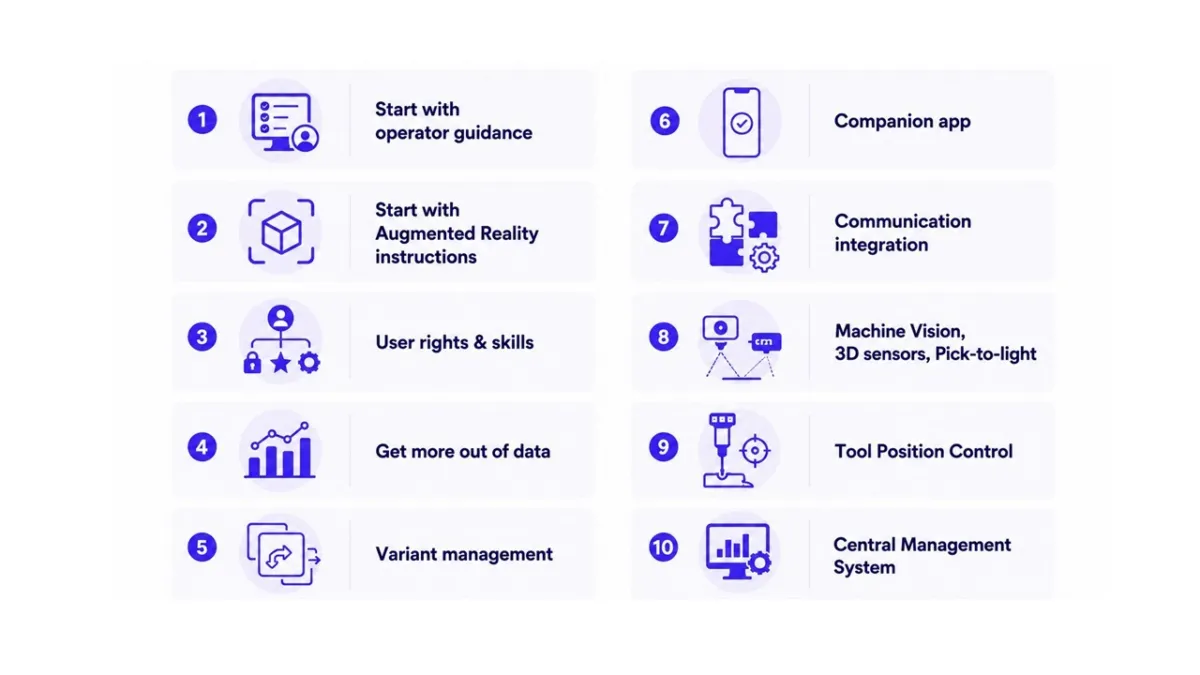
Get started with the fundamentals of the Ansomat Operator Guidance system and learn how to build clear, efficient, and error-proof digital work instructions for operators. This training module focuses on creating structured workflows, defining product models and configuring interactive operator guidance steps.
Connect Fastening Tools
Date: Thursday 04/06 - 10.00 CET
Duration: 30 Min
Discover how to create immersive Augmented Reality (AR) work instructions using Ansomat. In this module, you will learn how to connect & set up projector(s) and build visually guided AR instructions that enhances operator learning curve.
Date: Thursday 11/06 - 10.00 CET
Duration: 30 min
Learn how to manage users, permissions, skills, and personalized operator experiences inside Ansomat. This module explains how to configure different user rights, define operator skill levels, and display custom instructions depending on worker competencies and preferences.
You will also learn how to automate training intervals, configure notification services, implement NFC card readers, and enable automatic language translation for multilingual work environments. This training helps organizations build flexible and scalable operator guidance systems tailored to each individual operator.
Date: Thursday 18/06 - 10.00 CET
Duration: 45 Min
Data is the new goldmine and often worker action data is underused. This module focuses on understanding operator performance results, identifying bottlenecks, improving traceability, and turning worker data into actionable insights.
Participants will learn how to export data, analyse performance data to get meaningful insights, detect recurring issues, and improve continuous improvement initiatives using real-time production feedback.
Use insights for continuous improvement
Date: Thursday 25/06 - 10.00 CET
Duration: 30 Min
Managing numerous product variants can become complex very quickly. This training module teaches efficient strategies to manage high-mix production environments inside Ansomat. Learn how to reuse instruction structures, create modular workflows, and simplify variant management using conditions, variables, and submodels.
Participants will gain practical techniques to reduce engineering time and maintain scalable instruction systems even for highly customized products.
Use variables for dynamic instructions
Date: Thursday 02/07 - 10.00 CET
Duration: 30 Minutes
Learn how to install, configure, and use the Ansomat Companion App for mobile instruction support and content creation. This module explains how operators and engineers can use the app to capture images, document processes, and support instruction development directly from mobile devices.
The training focuses on practical usage scenarios and best practices for integrating mobile tools into daily production workflows.
Use mobile tools for instruction creation
Date: Thursday 09/07 - 10.00 CET
Duration: 30 Minutes
Learn how to integrate Ansomat with external systems and industrial communication platforms. This module provides an introduction to Node-RED, MQTT and other communication protocols to help participants connect Ansomat with MES, ERP, PLC, or custom automation systems.
Participants will gain a practical understanding of industrial communication methods and how to exchange production data between Ansomat and external applications.
Integrate Ansomat with MES and ERP systems
Date: Thursday 16/07 - 10.00 CET
Duration: 1 Hour
This module introduces advanced sensor technologies that can be integrated with Ansomat with the aim of validating operator actions. Participants will learn how machine vision systems, 3D sensors, and Pick-to-Light (PTL) technologies can automate validation and support assembly operations.
The training provides practical examples and configuration guidance for each sensor type.
Configure Pick-to-Light systems
Date: Thursday 23/07 - 10.00 CET
Duration: 1 Hour
Learn how to implement Tool Position Control technologies inside Ansomat to ensure tools are used in the correct position during assembly operations. This module covers multiple positioning technologies including ZeroKey, machine vision, and positioning arms.
Participants will understand how positional validation improves process quality, traceability, and operator guidance in advanced manufacturing environments.
Configure positioning arms with encoders for position control
Date: Thursday 30/07 - 10.00 CET
Duration: 20 Minutes
Learn how to centrally manage work instructions, users, projects, and system settings using the Ansomat Management System. This module provides a practical overview of maintaining and deploying Ansomat environments efficiently across multiple workstations
Advanced authoring rights & approval flows
Learn more at Ansomat Management System
Find here the registration link to subscribe for one or multiple trainings
